


Making Internet Accessibility Mainstream
Real-Life Accessibility
January 2006
Steve Krug is a usability expert who has helped client companies such as AOL, Apple, Netscape, Nexus, and Excite@Home develop products and Web sites that people can actually use and enjoy. He is the author of the book Don't Make Me Think! A Common Sense Approach to Web Usability, now in its second edition, which includes a new chapter on Accessibility, "Accessibility, Cascading Style Sheets, and You." Steve's consulting firm is Advanced Common Sense, and his Web site is www.sensible.com. Steve spoke to Boston-IA on January 26, 2006.
Topic: "Real-Life Accessibility"
Date: January 26, 2006
Speaker: Steve Krug
Location: Bentley University
Waltham, Massachusetts
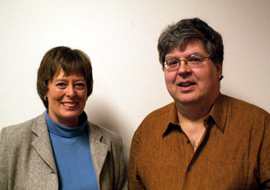
Boston-IA Founder P.J. Gardner with Speaker Steve Krug
Steve Krug polled the packed classroom of attendees to find out how many of us had read his book. About half had read the first edition, and one or two people had read the second edition.
Many reasons are given for the rationale behind making Web sites accessible. For Steve, the most compelling reason is because it's the right thing to do, and we don't get that many chances to do the right thing. Very often, people do not make the best arguments to CEOs or to 20-something-year-old Web developers who are already overloaded with work. Sometimes the case is overstated with regard to the work required or the effect on the Web site. In addition, statistics about the disabled population are sometimes exaggerated, because the statistics include people who are near-sighted or are impeded by technological barriers as well as physical ones.
Is accessibility the enemy of design? Does a site have to be dumbed down to build in clarity? Does the design have to be watered down? Steve feels that the answers to these questions is, No.
Download Steve's presentation, access the text-only version of Steve's presentation, and read on to learn more.
- Slides from Steve Krug's presentation.
(requires Microsoft PowerPoint, 1369 KB) - Text-only version of Steve Krug's presentation.
Steve stated his views about the most important things you can do right now—or the least you can do—to improve accessibility:
Fix the usability problems that confuse everyone.
Do some testing with users, or respond to users' comments and questions regarding the site.
Read an article.
Steve suggested reading "Guidelines for Accessible and Usable Web Sites: Observing Users Who Work with Screen Readers," by Mary Theofanos and Janice (Ginny) Redish. This study describes 32 issues for blind users. Find the article at: http://redish.net/content/papers/interactions.html.
Read a book.
Steve brought along an array of Web accessibility books for people to look at with varying publishing dates and depth of information. Some of the books recommended and discussed were:
- Access by Design: A Guide to Universal Usability for Web Designers, Sarah Horton
- Maximum Accessibility: Making Your Web Site More Usable for Everyone, John M. Slatin and Sharron Rush
- Constructing Accessible Web Sites, Jim Thatcher and others
- Building Accessible Websites, Joe Clark
- Web Accessibility for People with Disabilities, Michael G. Paciello
- WebAIM Guide to Accessibility (Book on CD in Web format)
Start using Cascading Style Sheets (CSS).
Some advantages to switching to cascading style sheets are greater control of formatting, and design flexibility. In addition, you can put your content in the order that you want a screen reader to read it. And, perhaps most important, you can specify scalable units of measurement such as ems and percentages to allow the text to be resized.
People with disabilities can potentially override your CSS and use a different CSS to accommodate their needs, but this capability is really not well supported at the present time.
Tip: To test for reading order, copy Web page text in the browser window and paste it into Notepad.
For information about creating cascading style sheets, two good books are Eric Meyer on CSS: Mastering the Language of Web Design and More Eric Meyer on CSS (Voices That Matter), both by Eric A. Meyer.
Go for the low-hanging fruit.
- Use the alt attribute for images. Also, use null alt text for images that a screen reader should ignore.
- Make your forms work with screen readers. Make forms accessible by associating labels with fields and controls, and by ordering the fields to make sense.
- Add a link to Skip to Main Content at the beginning of each page. This feature allows the person using a screen reader to skip over global navigation that appears on every page.
- Make all content accessible by keyboard.
- Don't use JavaScript without good reason. Some adaptive technologies do not support JavaScripting well. Add a no-script alternative if you are using JavaScript.
- Use client-side, not server-side, image maps. You can use alt attribute text for every region in a client-side image map.
Tip: In addition to using mouseover and other mouse-dependent actions (called event handlers), use onblur and onfocus.
Steve then showed us his Web site (www.sensible.com), both before and after being worked on to be more accessible by Boston-IA's founder, P.J. Gardner. Steve and P.J. described a few of the "before" and "after" changes:
- Before the redesign, the links in the JAWS Links List used non-descriptive words and phrases, such as "Let me know." After the revision, Steve used more descriptive words and phrases for his links. (The JAWS Links List gathers a list of hyperlinks on the page, either in the order they appear or in alphabetical order.)
- Before the redesign, Steve used images for his headings, making it difficult for people using screen readers to navigate the site using headings. Following the redesign, the headings are tagged using standard heading tags, and the CSS is used to format them using a blue background and white foreground.
- Before the redesign, much of the text was not resizable. With CSS that defines scalable font sizes, the text is resizable in all browsers, including Internet Explorer.
Learning More
People in the audience offered favorite Web sites, accessibility tools, and other resources for background and examples:
- A List Apart: Contains useful articles on accessibility issues.
- 456 Berea Street: A Web log from Sweden.
- Westciv: Web standards software and learning.
- Accessibility of the AJAX application: A WebAIM article about the new application that allows Web pages to update automatically.
- Vischeck Color Checker: Used to test Web designs for color accessibility.
Tip: Make an image of the page (JPG) and test the image.
- WayBack Machine : For looking at older versions of a web site (through March 2005).
- JAWS Screen Reader: The most popular screen reader for blind users.
- IBM Homepage Reader: A popular screen reader for Web surfing (no longer available).
- Watchfire WebXACT: An accessibility evaluator, similar to Bobby, that checks one Web page at a time (no longer available).
Barbara Casaly is a member of Boston-IA and a senior member of STC. She is the manager of Member Profiles for the STC Boston Chapter and serves on the STC Internet Committee.
© 2006 Barbara Casaly. All rights reserved.
Photograph © 2006 Harvey Bingham. All rights reserved.

© 2003-2016 Gardner Information Design, Inc. All rights reserved.